
introduction
It’s annoying to have people your Supercell ID. There can be many reasons for it; Sold your last mobile phone, gave access to your friends, gave login details to account boosters and vice versa. Now you don’t know how many people have access to your account and how to deal with that.
There are actually quite a few ways in which you can log out all the devices connected with your Supercell Email ID.
Required things
What do you need for this to complete are following :
– Access to your Supercell Email Access (MOST IMPORTANT)
– Another mobile device (not used with your Supercell Account before)
In case you don’t have any extra available device there’s another way to complete this procedure. I will mention it at the end of this Blog.
Logging out of all devices
Step # 1 : Grab your New Device that’s not used with your Supercell ID before and try to login your account.
Step # 2 : Login into your Email address
Step # 3 : You will receive 2 email from Supercell. One with the Supercell login code and the other one will look the following.
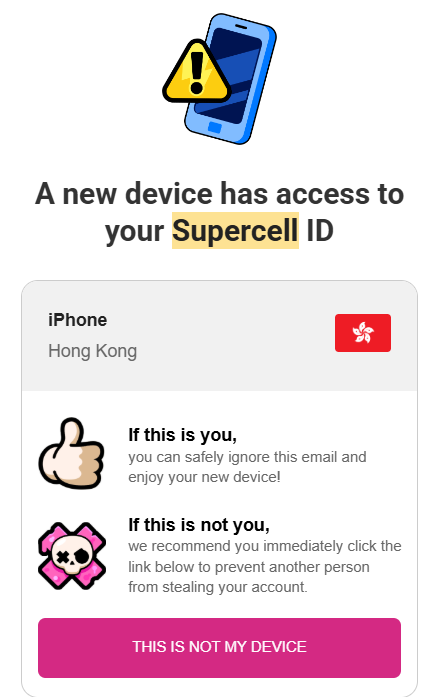
Step # 4 : Click the button “THIS IS NOT MY DEVICE”
Step # 5 : A new supercell page will open and ask your permission to delete all the currently logged in devices.
Step # 6 : Click on Log out all the devices.
And that’s the safest and easiest method to do so.
How to log out all the devices without an extra mobile
Now for the question, What if you only have 1 device. How can you still log out all the devices?
This one is also workable but it’s a bit risky sometimes especially if you have purchased your Supercell ID like Clash Royale account,
( Note : Try on your own risk )
For This one to work. All you have to do is :
Open your Game
Open Settings
Select ‘Help and Support’
Tap the button in the top right corner of your screen and contact Supercell Support.
If you have Enabled your account protection then they only verify it with the attached mobile number.
BUT if you don’t have enabled account protection. They’ll ask a lot of information to confirm if it’s your account or not.
For Example :
– Player ID/Player Tag/ Game Tag
– Account Name or Any Previous Names
– Account Level (King Tower or XP Level)
– Name of Clan ( If you are in one)
– Transaction IDs ( MOST IMPORTANT) of the purchases you have made on the account. You can find them in your App store or Email.
Once it’s all done. Just ask the support to help you log out of all the devices or Ask them currently how many devices this account has logged in.
That’s All.
Best Wishes,
SuperClashCN
/